gcode_reader.emulate.machine
Classes
An emulation environment for a generic CNC machine. |
Module Contents
- class gcode_reader.emulate.machine.Machine(tools: Tuple = None, parser: gcode_reader.emulate.parsers.GcodeParser = GcodeParser(), exporter: gcode_reader.emulate.exporters.GcodeExporter = GcodeExporter(), **options)[source]
An emulation environment for a generic CNC machine.
This class acts as an orchestrator for processing sequences of machine commands (Operations). It maintains the machine’s state, such as position and feed rate, and applies kinematic models (motion profiles) to each movement.
It is designed to be configurable with different tools, parsers, exporters, and machine-specific options.
- options
The configuration object containing parameters like max feedrate and acceleration.
- parser
The parser instance used to convert G-code files into Command objects.
- Type:
- exporter
The exporter instance used to convert Command objects back into G-code strings or other formats.
- Type:
- motion_profile_type
The motion profile class (e.g., Trapezoid) used to calculate movement kinematics.
- Type:
Initializes a new Machine instance.
- Parameters:
tools (Tuple[Tool, ...], optional) – A tuple of Tool instances for the machine to use. Defaults to None.
parser (GcodeParser, optional) – An instance of a GcodeParser. Defaults to a new GcodeParser().
exporter (GcodeExporter, optional) – An instance of a GcodeExporter. Defaults to a new GcodeExporter().
**options – Keyword arguments passed to the constructor of the machine’s MachineOptions type.
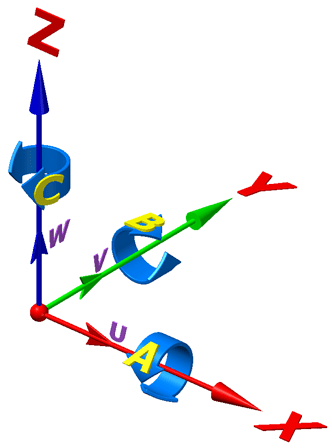
- static abc_to_tool_direction(A: float, B: float, C: float) tuple[source]
Convert 5-axis A/B/C Euler angles (degrees) to a unit tool direction vector.
Rotations about X (A), Y (B), Z (C) are applied in that order from Z-up.
Reference Image: https://www.mastercam.com/wp-content/uploads/2021/09/axes.png
- Parameters:
A – Rotation about X-axis in degrees.
B – Rotation about Y-axis in degrees.
C – Rotation about Z-axis in degrees.
- Returns:
Normalised (x, y, z) tuple representing the tool direction.
- apply_motion_profile_to_operation(operation: gcode_reader.emulate.operations.Operation)[source]
- export_operation_event_series(operation: gcode_reader.emulate.operations.Operation, spatial_scale_factor: float = 0.001, destination: str = None)[source]
Write a process event series for an Operation
- Parameters:
operation (Operation) – The Operation object to be processed. It should have been created or processed by this same machine type.
spatial_scale_factor (float, optional) – A multiplicative factor to convert spatial units from the Operation (typically millimeters) to the desired output units (typically meters). Defaults to 1e-3.
destination (str | None, optional) – The full path for the output file. If None, a path is automatically generated from the operation’s name, e.g., ‘MyPart_event_series.aes’. Defaults to None.
- Returns:
A DataFrame containing the event series.
- Return type:
- gcode_file_to_operation(filepath: str, operation_type: type = Operation)[source]
Parses a G-code file and returns a processed Operation.
This method uses the machine’s configured parser to read a G-code file into a list of commands, wraps them in the specified operation_type, and then processes the operation to populate its process data.
- Parameters:
- Returns:
A new, processed Operation instance.
- Return type:
- Raises:
ValueError – If operation_type is not a valid subclass of Operation.
- get_motion_limits()[source]
Retrieves and prepares motion limits from the machine’s options.
- Returns:
- A dictionary containing ‘velocity’, ‘acceleration’, and ‘jerk’
limits, with velocity converted to units/sec.
- Return type:
- operation_to_dataframe(operation: gcode_reader.emulate.operations.Operation) pandas.DataFrame[source]
Processes an Operation and converts it into a Pandas DataFrame.
This method ensures an operation is fully processed, then converts each command and its corresponding process data into a pandas Series. These are combined into a single DataFrame for analysis.
- Parameters:
operation (Operation) – The operation to be converted.
- Returns:
- A DataFrame where each row represents a command and
its associated process data.
- Return type:
pd.DataFrame
- process_command(command: gcode_reader.emulate.commands.Command, operation_type=Operation, skip_tool=False) gcode_reader.emulate.operations.ProcessData[source]
Processes a single command to generate its ProcessData.
This method dispatches a command to the appropriate internal helper (_move, _dwell, etc.) and optionally to any attached tools to calculate derived data like new position, distance traveled, and tool-specific metrics.
- Parameters:
command – The command to process.
operation_type – The parent operation’s type, used to determine the type of ProcessData to create. Defaults to Operation.
skip_tool – If True, skips tool processing. Defaults to False.
- Returns:
The populated data object for the command.
- Return type:
- process_operation(operation: gcode_reader.emulate.operations.Operation, force=False, skip_tool=False) gcode_reader.emulate.operations.Operation[source]
Fully processes an Operation, calculating all derived data.
This is the main entry point for simulating an operation. It first calculates basic process data (location, distance, etc.) for each command. It then applies the machine-wide motion profile to calculate kinematic data like elapsed time.
It avoids re-processing an operation that has already been processed by this same machine instance unless force is True.
- Parameters:
operation – The operation to process.
force – If True, re-processes the operation even if it has been processed by this machine before. Defaults to False.
skip_tool – If True, skips tool processing during the command processing phase. Useful for two-pass processing where tools depend on motion profile data (e.g., elapsed_time) that isn’t available until after the first pass. Defaults to False.
- Returns:
A new, fully processed Operation instance.
- Return type:
- translate_command(command: gcode_reader.emulate.commands.Command, old_meta: gcode_reader.emulate.operations.ProcessData)[source]
Translates a command for a different machine context.
This helper function is intended to be called when transferring an operation processed by one machine to another. It allows for machine- specific adjustments to the command itself.
- Parameters:
command (Command) – The command to translate.
old_meta (ProcessData) – The process data of the command as calculated by the previous machine.
- Returns:
The translated command.
- Return type:
- write_gcode_file(filepath: str, operation: gcode_reader.emulate.operations.Operation, overwrite: bool = False)[source]
Processes an Operation and writes the resulting G-code to a file.
This method processes the sequence of commands in the operation and uses the exporter to generate a formatted G-code string for each one. The resulting lines are then written to the specified file.
WARNING: ALWAYS REVIEW GENERATED G-CODE BEFORE FOR CORRECTNESS AND SAFETY BEFORE EXECUTING ON A MACHINE.
- property absolute_position
- property coordinate_system
- property exporter
- feed_rate_time_base_s = 1.0
- property home
- property incremental_position
- property motion_profile
- property options
- property parser
- process_command_helpers
- property tools
- unit_per_meter = 1.0
- property work_offset